About
08 / 25
Dumpster
Capture everything. Keep what matters. Dump thoughts, ideas, citations to be reused in the future. Edit or delete. Recycle with an any external AI chatbot if lazy.
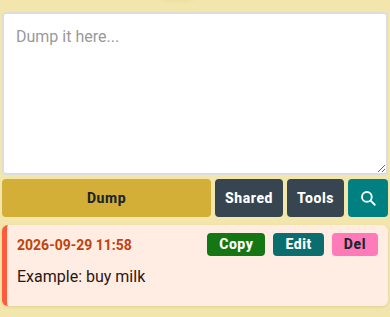
How to use
- Type in Dump it here…, tap Dump.
- On a note, tap Copy, Edit or Del.
- Tap 🔍, type, press Enter to search.
- Tap Tools, then Add Command: name it, write an AI prompt, tap Add.
- In Tools, tick notes or All, pick a command, tap Export.
- A text file downloads: your prompt on top, notes below. Paste it into your AI.
📏 Limit: 200 notes, 60 dumps an hour, 5 commands.
Shared notes
- Tap Shared, then Create.
- Add a title and your section, tap Create Note.
- Type a friend's username, tap +.
Who can do what
- 👤 You: edit your section, invite, remove the collaborator, delete the note.
- 👥 Friend: edit their own section, leave the note.
- ⚠️ One note, two sections: each writes only their own.