About
14 / 25
Health
Track meals, count calories, and build your personal food database. Save meal templates, duplicate entire days, and export any day for AI analysis.
How to use
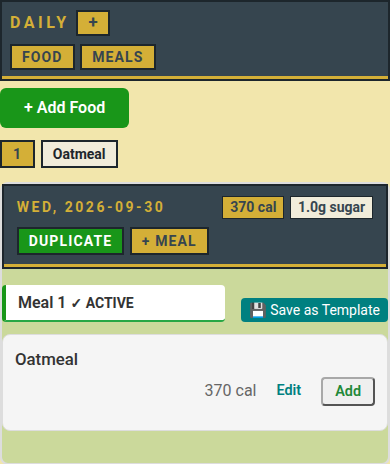
- Tap FOOD, then +.
- Type the food name, pick a category, fill in calories, sugar and salt per 100 g, tap Save food.
- Tap + on the daily page to start a meal.
- On FOOD tap ADD: the food goes into the active meal at 100 g.
- Tap Edit on the entry to set the grams, or Delete Entry.
- Or tap + Add Food, pick My or Global, search or tap a category.
- Tap 💾 Save as Template; on MEALS add the whole meal again in one tap.
- Tap DUPLICATE on a past day to copy it to today.
- Tap the day header for AI CHAT (text to paste into an AI) or JSON.
Coach
- On your profile, type a username under COACH, tap +: they may log meals for you.
- The coach taps Me or your name to switch whose log they write.
- The coach taps → and your name on a food to copy it into your food list.
- Either side taps × to end it.
📏 Limit: Multipass 3000 entries, 200 foods, 33 templates; demo 30, 10, 3.
Who can do what
- 👤 You: log, edit, delete your own meals and foods.
- 👥 Coach: log for one student, share foods with them.
- 🛠️ Staff: REVIEW new foods, approve them to Global.
- ⚠️ Global empty? → A food shows there only after staff approve it.